Our biggest release yet, is out now.
We are so excited to introduce the latest version of the Grow platform, Grow 6. 17 different features across the whole app, and including some of our most requested features and improvements.
This new release is live in your Grow account today.
Power to the Analyst, Simplicity for the Business User
Companies invest in business intelligence to get insights from their data, to know what happened and why it happened. BI allows you to answer any question from your data.
Good decisions are key to your growth and Data is at the heart of those good decisions. Since many of us are now working remote, everyone making decisions need access to the right data. This is more important now than ever before.
However, traditional Business Intelligence is broken. When you lock the data into complex, enterprise tools, it's not accessible to business users. Everyone goes to the analyst for their request. This isn’t effective and scalable for the analyst. We have talked to so many people that say, “because of how technical it is, I can’t explore or modify the answers I get, I have to keep going back to the analyst, so pretty soon I just stop going back.” And that’s when they stop looking at the data.
Our mission at Grow has always been to free the insights in a powerfully simple way for business users AND analysts. To support that mission, we’ve always had and always will have an unlimited user model.
We are so excited to introduce the latest version of our platform, Grow 6.
The secret sauce of the Grow 6 release is that we increased the power and scalability for the analyst while improving and simplifying the features for everyone, that make exploring data and getting insights faster and easier than ever before.
6 Categories of New Features
All the new features break down into these six categories.
1. Data Storage and Capacity
2. Data Management
3. Data Explorer
4. New & Faster transforms
5. New Sharing Tools and Experience
6. Architecture & Security
Data Storage & Capacity
Data Warehouse

Data Management
Data Overview
- Data is the lifeblood of your business and the Data Overview page is the place where you can see and manage it all. Here you can see your all Connections, Warehouse tables, and Datasets. Manage access to connections, see when Warehouse tables last updated, and verify Datasets.

Needs Attention page

Files Management
- Grow is the single hub for all your data. The new Files Management page makes it easy to use and manage any of the csv and Excel files you need to analyze and create visualizations for. You can switch out files as the data becomes outdated as well as manage access to files.

Verified Datasets
- Everyone in your company should be able to look at data to make decisions. But agreeing what data is correct can be hard. Avoid the file and definition ping pong with Verified Datasets. Admins and analysts can mark a Dataset as verified. This means the data and logic in that Dataset is correct and can be used by anyone in the company.
In the Data Tab, click on a Dataset. The new Verified button, when clicked, will add a verified badge to the Dataset name that appears in 4 locations:

Data Explorer
Data Explorer (Builder)

Dashboard Filtering

Goal Module

Improved Expanded Mode

Table Chart Improvements with Conditional Logic
- Having to visually scan your data for anomalies or checking each row of a table mental against it expected value takes a lot of time. Conditional Logic allows you to set rules and then format your table against those rules. Show high performers in green or areas that need attention in yellow. If a number is below a goal, it can be bolded and the background turned red.

New & Faster Transforms
New Transforms in ETL
- Transforms allow you to clean and prep your data without knowing SQL. Many APIs return data structures instead of clean rows. The new JSON and Array transformations help you to format your data as clean usable rows. You can use the new transforms to break out JSON and Arrays into rows. You can define the JSON keys, all without knowing SQL.

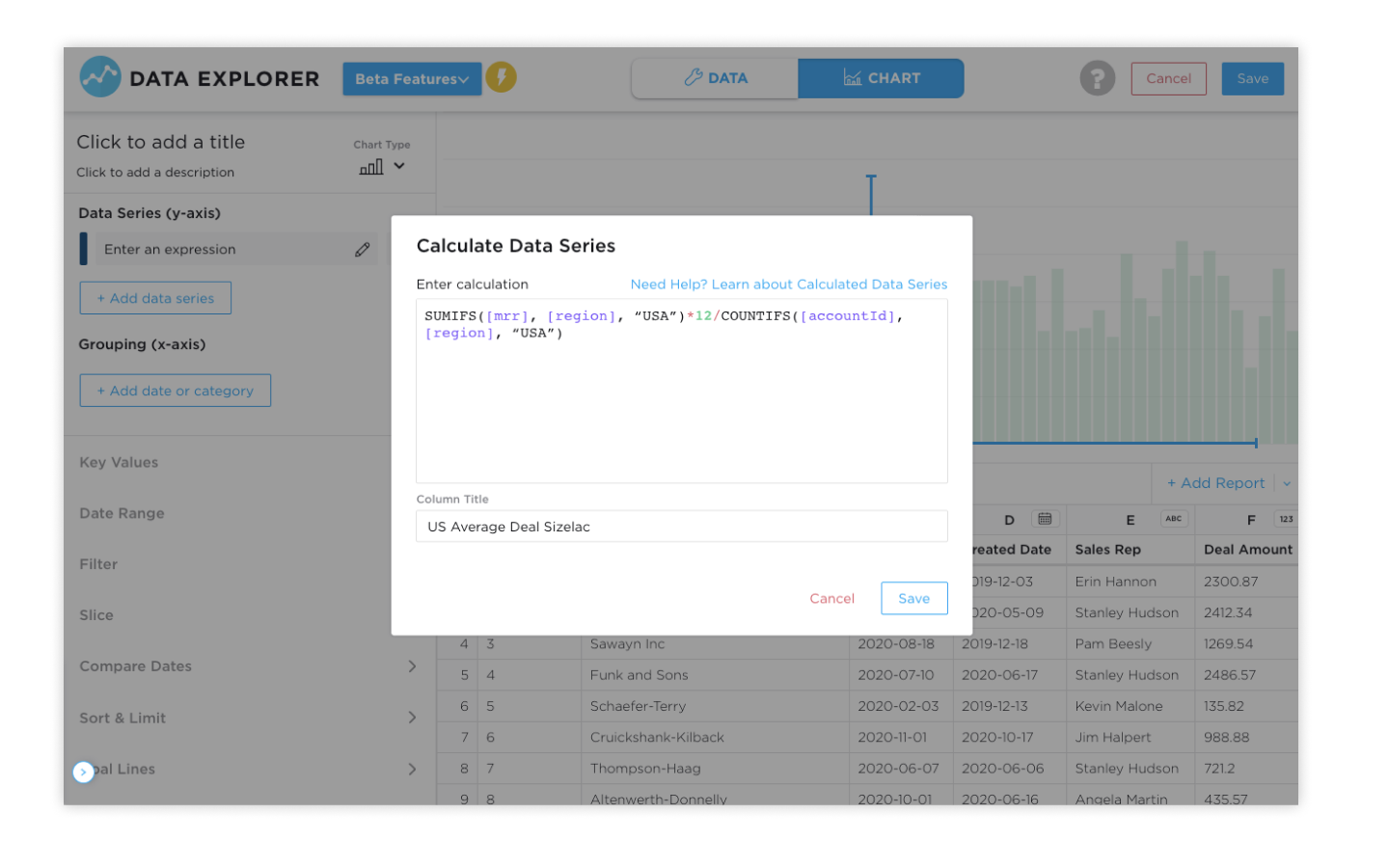
Calculated Data Series
Multi-Joins
- Combining data from various data sources is one of the super powers of Grow. It allows you to answer questions you couldn’t from just a single source. By combining sales data with ads, you can see which ads drive the most revenue. With the new Multi-Join, you can join many reports into one with ease.

Union-All

New Sharing Tools and Mobile Experience

Architecture & Security
Data Pods Architecture
- Each Grow customer now has their own Data Pod. This means that your companies data and processes run on their own powerful set of servers. Grow Data Pods make it so poorly written process that another analyst is running can’t affect your companies performance and power.

SOC II Compliance
- Keeping your data secure is our number one priority. Grow is now SOC II compliant and certified. This means independent auditors and testers have made sure Grow has the processes and procedures in place to make sure your data is safe and secure.

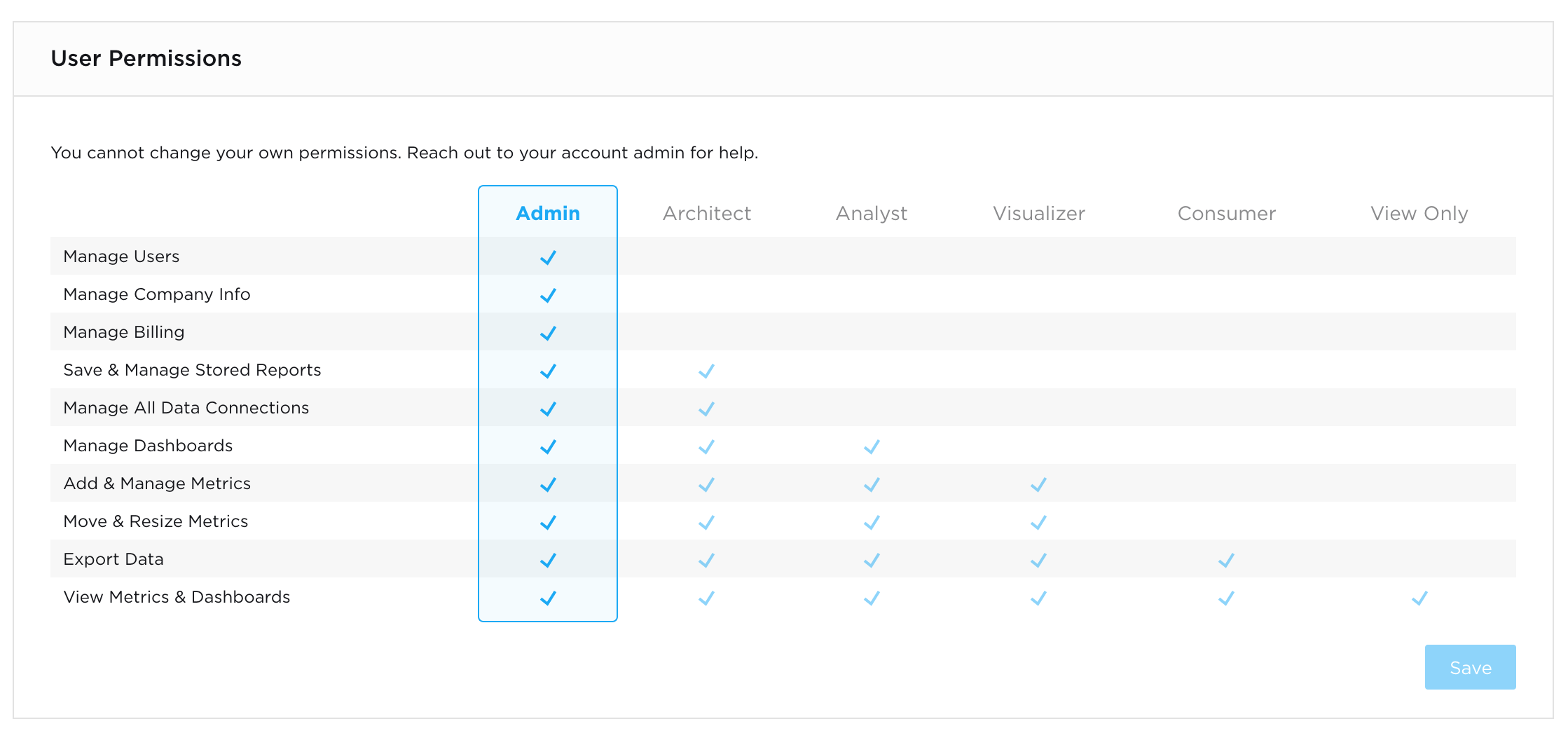
User Permissions
- Everyone at your company should be able to use data to make decisions. However, you may need to control who has access to what, and with what capabilities. With our new upgraded User Permissions, you can easily assign users to 6 new roles that make it clear, what they can and cannot do.
Grow 6, live now
If you're are a current Grow customer, all these new features are live in your account now! If you need some guidance you can go to our Help Center or reach out to our support team.
If you're not a Grow customer, what are you waiting for? Set up a free trial now.


